

Google’s Chrome Skills Launch Signals a New Front in the AI Workflow Wars
AI News | Editor: Sandy Google has moved artificial intelligence one step closer to the everyday act of getting work done. According to the company’s latest pos
AI News | Editor: Sandy Google has moved artificial intelligence one step closer to the everyday act of getting work done. According to the company’s latest pos
AI News | Editor: Sandy
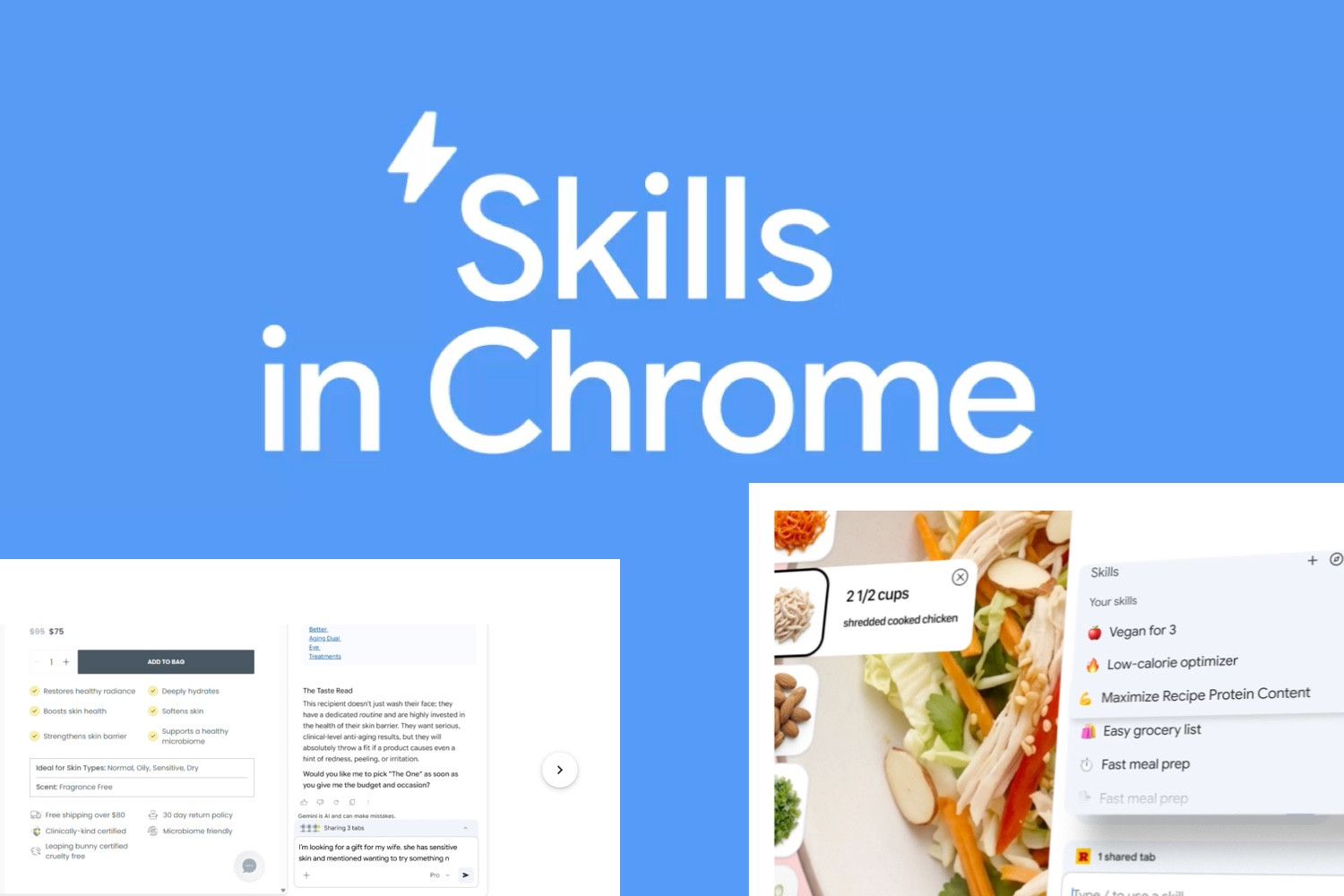
Google has moved artificial intelligence one step closer to the everyday act of getting work done. According to the company’s latest post, “Turn your best AI prompts into one-click tools in Chrome” (https://blog.google/products-and-platforms/products/chrome/skills-in-chrome/), Chrome has begun rolling out “Skills” for Gemini in Chrome on desktop, allowing users to save frequently used AI instructions as one-click workflows instead of typing them out again and again. At the same time, Google has introduced a library of ready-made Skills for common tasks, including scanning documents and calculating calories. At first glance, this may look like a modest convenience feature. In reality, it signals something larger: the competition in AI is shifting away from model performance alone and toward who can most effectively occupy the user’s daily point of entry.
The basic idea behind Chrome Skills is simple, but strategically weighty. In Gemini in Chrome, users can type a forward slash to bring up saved Skills, turning what used to be scattered, hard-to-remember prompts into repeatable, standardised workflows. The value of this design lies in how it compresses one of generative AI’s most persistent irritations—having to rethink, retype and reframe prompts each time—into something closer to a software shortcut. In other words, Google is trying to make AI less of a one-off conversational assistant and more of a set of lightweight automation tools embedded directly inside the browser.
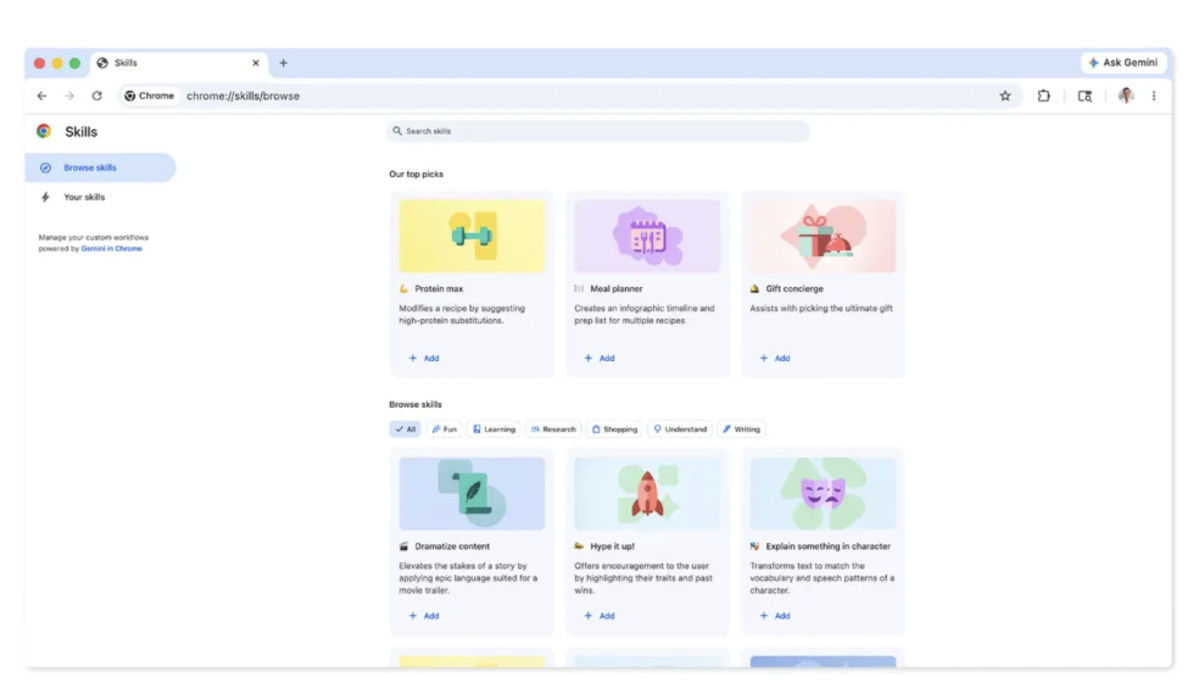
That marks a notable departure from how chatbots were used in their earlier phase. Many users have spent the past two years saving favourite prompts in note-taking apps, documents or plain text files, repeatedly copying and pasting them back into chat windows. By building that behaviour directly into Chrome, Google is acknowledging an important fact: prompts themselves are becoming part of the modern software interface. When a user can turn “summarise this document”, “compare these product pages” or “estimate the nutritional value of this meal” into quasi-fixed routines, AI stops being merely a question-answering layer and starts absorbing work that was previously spread across tabs, scripts, forms and manual switching.
Seen over a longer timeline, Chrome Skills looks less like an isolated feature and more like a natural extension of Google’s recent browser AI strategy. According to Google’s blog post “Chrome gets new Gemini 3 features, including auto browse” (https://blog.google/products-and-platforms/products/chrome/gemini-3-auto-browse/), the company has already upgraded Gemini in Chrome into a sidebar assistant able to reason across tabs and connect with services such as Gmail, Calendar, Maps, YouTube, Google Shopping and Google Flights. In other words, Skills is not a single-point innovation. It builds on an existing layer of model capability, tab awareness and service integration, then pushes it one step further into reuse.
That extra layer matters. The first phase of generative-AI competition was about whether the model could answer intelligently. The second was about whether it could fit into real working contexts. The third is increasingly about whether high-frequency tasks can be packaged into low-friction, low-learning-cost actions. Google now appears to be targeting that third stage. Once AI is placed inside the browser—the place where people read, search, shop, compare, write and process documents—and once it can be stored and summoned as a Skill, Chrome begins to look less like a browser and more like a work platform with memory for personal workflows.
Technically, the significance of Skills is not merely that prompts can be saved. It is that prompts, context and execution are being bound together. Chrome enjoys several native advantages that many standalone AI products do not easily replicate. First, it knows which page the user is looking at and what tabs are open. Second, it can connect to Google’s own services, including mail, calendars, maps and video. Third, it is already a cross-device, cross-context piece of software that millions use every day. Google has also said that Skills will sync across signed-in desktop devices and will inherit Gemini in Chrome’s existing privacy and safety protections. Sensitive actions, such as sending emails or creating calendar events, still require user confirmation.
These may sound like conservative design choices. In practice, they reveal Google’s relatively cautious path toward agentic AI. Rather than unleashing a fully autonomous system to roam the web, Google seems to be narrowing the focus to high-frequency, low-risk, template-friendly tasks. That may be less dramatic than the grandest visions of autonomous agents, but it is probably closer to what mass-market users will actually adopt. For most people, stability, predictability and reusability matter more than theatrical autonomy.
Viewed internationally, Google is far from alone in trying to turn prompts into durable assets. According to the Microsoft Visual Studio Blog post “Boost Your Copilot Collaboration with Reusable Prompt Files” (https://devblogs.microsoft.com/visualstudio/boost-your-copilot-collaboration-with-reusable-prompt-files/), Microsoft has already experimented with making reusable prompt files part of Copilot-based development workflows, so teams can store and share successful prompting patterns in code repositories rather than rediscovering them individually. Meanwhile, according to Microsoft Learn’s “Use your prompt actions in Microsoft Copilot Studio” (https://learn.microsoft.com/en-us/ai-builder/use-a-custom-prompt-in-mcs) and “Add inputs to your prompt - Microsoft Copilot Studio” (https://learn.microsoft.com/en-us/microsoft-copilot-studio/add-inputs-prompt), Microsoft is also embedding prompt logic into Copilot agents, Power Apps and Power Automate, applying it to document processing, structured extraction and automation.
That suggests the largest American technology firms are converging on the same destination, even if they are approaching it from different angles. Microsoft is placing reusable prompting inside enterprise workflows, development environments and organisational process design. Google is placing it inside Chrome, much closer to everyday browsing and general-purpose desktop work. The former expands outward from enterprise infrastructure; the latter pushes inward from a mass consumer entry point. Both are ultimately trying to solve the same problem: once generative AI becomes widespread, who can best transform scattered conversational capability into a repeatable, manageable and accumulative way of working?
Anthropic offers another revealing comparison. According to the company’s article “Equipping agents for the real world with Agent Skills” (https://www.anthropic.com/engineering/equipping-agents-for-the-real-world-with-agent-skills), its concept of Agent Skills is aimed more at giving agents procedural knowledge and organisational context, even hinting at portable standards that could work across systems. That is not identical to Google’s browser-based implementation, but both respond to the same industry reality: no matter how powerful a model becomes, it still needs to be packaged into stable, reusable units of action before it can truly fit into working life. The difference is that Anthropic is speaking more to developers and enterprise agent frameworks, while Google is aiming at the browser layer for ordinary users.
In China, the competitive logic looks somewhat different. According to Alibaba Cloud Community’s “Alibaba’s Quark Unveils Revamped AI Browser, Deeply Integrated with Qwen” (https://www.alibabacloud.com/blog/alibabas-quark-unveils-revamped-ai-browser-deeply-integrated-with-qwen_602896), Quark’s desktop AI browser has already deeply integrated Qwen and related AI applications while targeting a very large installed desktop base. Another Alibaba Cloud Community post, “Alibaba Unveils Flagship AI Super Assistant Application Quark” (https://www.alibabacloud.com/blog/alibaba-unveils-flagship-ai-super-assistant-application-quark_602058), presents Quark as a user entry point combining search, research, writing assistance and task execution. That reflects a broader pattern in the Chinese market: rather than isolating the model as a chatbot, firms have moved more quickly to embed AI inside hybrid entry points that blend search, browsing, tools and content.
In that sense, Google’s launch of Skills in Chrome echoes an Asian-style contest over interfaces, though by a different route. Chinese firms have often pursued highly integrated super-app models. Google, by contrast, is using the browser and its account-based ecosystem to insert AI into the familiar desktop environment of a global user base. That makes Chrome Skills significant not only as a feature release but also as a defensive move to preserve control over the entry point itself. When the search box is no longer the only gateway, the browser sidebar, tab context and one-click workflows may become the new centres of attention.
From a European perspective, the real challenge may not be whether such features can be built, but how far they can go. European markets have long been more sensitive to data protection, platform power and AI transparency. Chrome Skills may promise convenience, but once an AI system is reasoning across tabs, connecting to personal accounts and invoking email or calendar functions inside a live browsing session, questions about data boundaries, prompt logging and permission control inevitably become sharper. Google’s insistence that actions such as sending mail or creating calendar events still require confirmation, and that the feature remains within Chrome’s existing security structure, is therefore more than a safety footnote. It is an early response to the most consequential issue ahead: as AI moves closer to workflows, product competitiveness can no longer rest on functionality alone. It must also be built on verifiable trust.
That is one reason Google’s approach differs from more aggressive visions of autonomous agents. A fully self-directed agent may be eye-catching. But for mainstream enterprises and mass users alike, the products that scale are often not the freest systems. They are the ones whose permission boundaries are easiest to understand, whose actions are easiest to audit, and whose errors are easiest to contain. Skills, built around one-click invocation of pre-shaped routines, sits squarely in that more marketable middle ground.
The most important aspect of this update is that it further blurs the line between conventional software features and AI features. In traditional software, features are defined first and users click buttons to invoke them. Generative AI reversed that logic: users describe what they want, and the model improvises a way to do it. Chrome Skills tries to combine both worlds. It preserves the flexibility of natural language while packaging high-frequency intentions into fixed, button-like entry points. For the industry, this suggests that the next wave of product design may not revolve around ever more menus and toolbars, but around creating semantic templates that can be learned, stored and reused.
That change could affect not only user experience, but also business models. If people increasingly rely on AI workflows built into browsers or office suites, demand may shift away from a portion of standalone productivity tools, browser extensions and low-end automation software. Small tools that once differentiated themselves by helping users summarise documents, compare products or structure web information may find it harder to maintain their edge if platform companies absorb those functions directly into the entry layer. For developers and start-ups, the centre of gravity may move away from single-purpose convenience features and toward more vertical, specialised and data-rich applications.
None of this means Chrome Skills is guaranteed to become a lasting behavioural shift. Google is currently limiting the feature to desktop users whose Chrome language is set to American English. That alone creates a considerable barrier for non-English markets, including Taiwan, multilingual Europe and many emerging economies. Saving prompts may appeal strongly to advanced users, but mainstream adoption depends on whether Google can reduce the setup burden to the point where almost no prompting knowledge is required. If it remains too complex, the feature risks reproducing the old problem of prompt engineering. If it becomes too simplified, it may collapse into a narrow library of preset templates.
A more fundamental question remains: will users actually build the habit of maintaining personal Skills inside the browser? Many AI features look compelling on first encounter but endure only when they apply to highly repetitive tasks, save visible amounts of time and deliver reliable results. Google’s decision to launch a built-in library of ready-made Skills suggests it understands that it cannot place all the educational burden on the user. It needs to offer immediate examples that are useful on day one. That is a pragmatic move. Whether it is enough to create a durable new habit is something the next few quarters will reveal.
Placed on a longer horizon, the real significance of Chrome Skills lies not in today’s saved keystrokes, but in Google’s attempt to define what the next browser should be. Taken together with Google’s recent Gemini in Chrome updates, the browser is no longer just a container for loading webpages. It is becoming an intelligent intermediary layer that understands tabs, connects services, invokes models, generates suggestions and may eventually execute portions of work on the user’s behalf. That development puts the browser back at the centre of strategic competition in technology.
For more than a decade, browsers looked mature and relatively settled, with competition focused mainly on speed, compatibility and security. In the generative-AI era, however, the browser has become newly important because it is one of the closest pieces of software to the user’s actual working context. Whoever builds the most natural AI interface there may gain influence over search distribution, shopping comparisons, information consumption, document handling and cross-service conversion. Seen in that light, Google’s rollout of Skills is not merely a convenience update for Gemini. It is a step toward a much larger ambition: when AI becomes the new operating layer, who gets to define the buttons, the commands and the workflows?
That contest is still far from settled. Google has Chrome’s global entry-point advantage. Microsoft retains deep control over enterprise workflows and office software. Anthropic is trying to shape the higher end of agent standards and work-oriented AI capability. Chinese firms are moving quickly to compress AI into super-entry points and consumer platforms. Chrome Skills therefore looks less like a standalone launch than a marker of where the industry is heading. The next phase of generative AI will not be decided simply by which model sounds smartest. It will be shaped by which company can turn those answers into repeatable, governable and genuinely habitual structures of work.
Leave your name and email to receive future updates from our blog and product insights.
【 AI News | Editor: Sandy】 Google’s newly released Gemini for Mac looks, at first glance, like a s...
Read Article
AI News | Editor: Sandy On April 16th 2026 Anthropic officially unveiled Claude Opus 4.7 and made it...
Read Article
Background This case features a dental clinic offering a wide range of services. The clinic already...
Read Article
AI News | Editor: Sandy Anthropic’s latest launch, Claude Code Routines, pushes AI coding tools from...
Read Article
AEO | Editor: Adda Lin AI Overviews Are Not Just a New Feature. They Change the Narrative Structure...
Read Article
AI Software | Editor: Sandy Flux AI is an all-in-one platform that combines AI image generation, ima...
Read Article
AI News | Editor: Sandy On April 10, Anthropic launched the beta version of “Claude for Word”, embed...
Read Article
In today’s increasingly competitive pet food market, many e-commerce brands face the same challenge:...
Read Article
AI News | Editor: Sandy The latest development surrounding Anthropic is not merely a product update....
Read Article
AI News | Editor: Sandy On March 31st 2026 OpenAI published an announcement of unusual weight: the c...
Read Article
ChatGPT Applications | Edited by Jason Chen When organizations begin adopting generative AI, the fir...
Read Article
AI News | Editor: Sandy On April 8, 2026, Anthropic unveiled “Claude Managed Agents,” a release that...
Read Article
Opinion / In-depth Analysis | Editor: Sandy As generative artificial intelligence evolves from answe...
Read Article
AI News | Editor: Sandy In its latest announcement in April 2026 ( https://ai.meta.com/blog/introduc...
Read Article
ChatGPT Applications | Edited by Jason Chen In the age of social media dominance, Facebook (FB) has...
Read Article
Pimker - The AI marketing platform built for businesses
© Pimker 2026 The AI marketing platform built for businesses All rights reserved.