

Accelerating Generative AI Development with Google Cloud Vertex AI Prompt Gallery
ChatGPT Applications | Edited by Jason Chen When organizations begin adopting generative AI, the first major bottleneck is often not choosing a model—it’s figur
ChatGPT Applications | Edited by Jason Chen When organizations begin adopting generative AI, the first major bottleneck is often not choosing a model—it’s figur
ChatGPT Applications | Edited by Jason Chen
When organizations begin adopting generative AI, the first major bottleneck is often not choosing a model—it’s figuring out how to write effective prompts. With the same model, a well-crafted prompt can produce accurate, stable, and repeatable results, while a vague prompt can lead to inconsistent, verbose, or even irrelevant outputs.
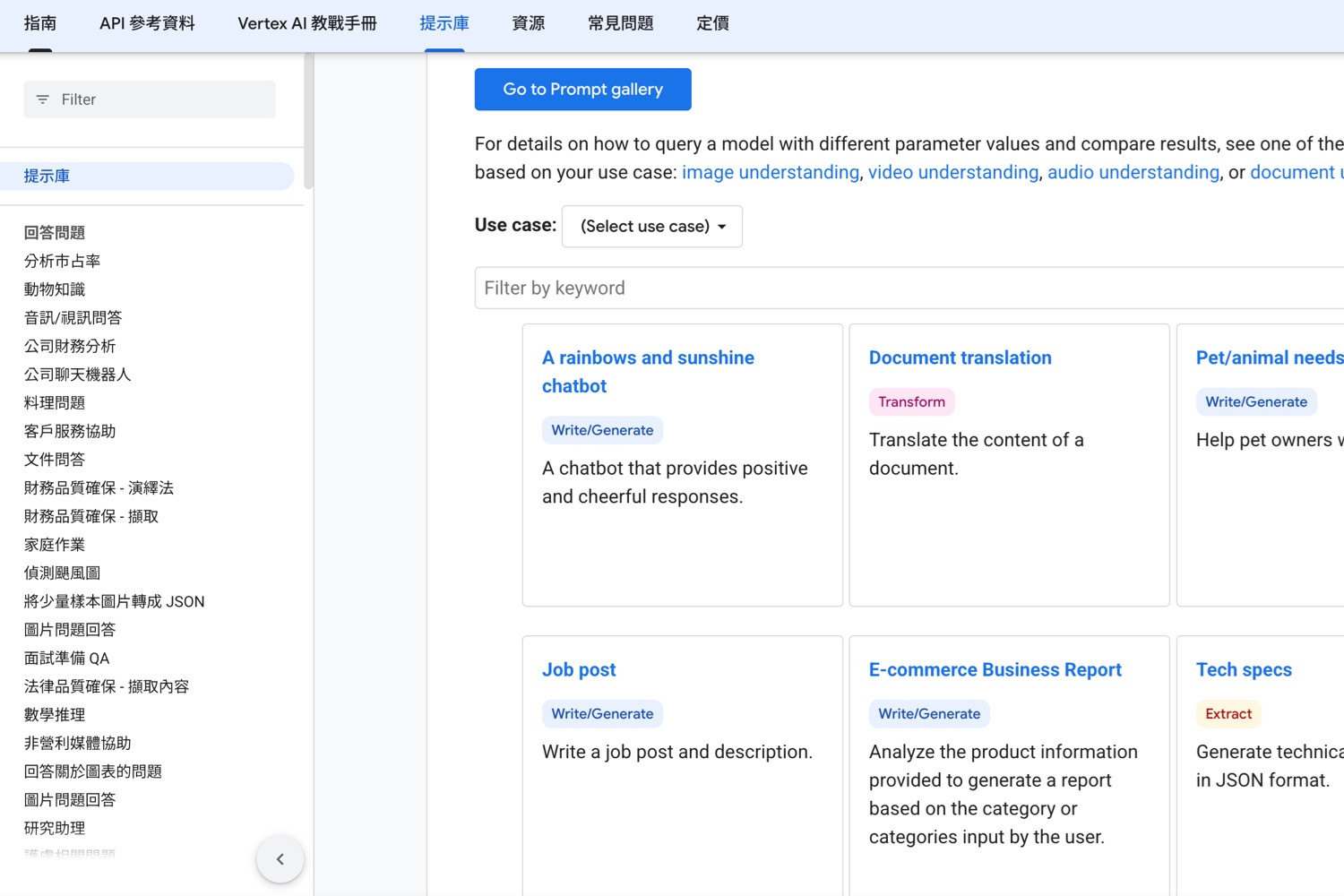
Google Cloud addresses this challenge through the Prompt Gallery in Vertex AI ( https://docs.cloud.google.com/vertex-ai/generative-ai/docs/prompt-gallery ). It provides a wide range of ready-to-use prompt examples, organized by task type, allowing teams to skip the blank page and quickly understand what a “good prompt” looks like in practice.
The importance of this cannot be overstated: prompt design itself is an engineering process. According to Google Cloud, a prompt is a natural language request submitted to a language model. It may include questions, instructions, contextual data, few-shot examples, or partial inputs for completion. Iterating on prompts and evaluating outputs is what we call prompt engineering. In this sense, the Prompt Gallery is not just a collection of templates—it is a practical learning resource for structuring tasks, understanding patterns, and building reusable prompt strategies.
Many people think of prompts as simple commands. In reality, a good prompt is closer to a mini specification document. It typically defines four key elements:
The Vertex AI Prompt Gallery is powerful because it embeds these elements into real examples. You can see how question-answering prompts restrict responses to provided data, how classification and extraction tasks define clear schemas, and how writing or coding prompts specify tone, structure, and rules.
Even more importantly, Google Cloud complements these examples with tools for experimentation. You can test prompts directly in the Console and use the Compare feature to evaluate different prompts, models, or parameter settings side by side. This is critical for production use cases, where success is not just about generating output—but ensuring consistency, correctness, and maintainability.
If you treat the Prompt Gallery merely as a place to copy examples, you’re missing its real value. A better approach is to use it as the foundation of your generative AI workflow:
Start with a template that closely matches your use case
Adapt it with your business context and data
Refine it with output constraints and evaluation criteria
Test and compare variations
Finally, integrate it into your application or workflow
Parameters also play a key role. For example, temperature controls randomness—lower values produce more deterministic outputs, while higher values increase creativity. Top-P and Top-K influence how the model samples candidate tokens. This means prompt engineering is not just about wording—it’s also about tuning generation behavior.
Based on Google Cloud’s guidance, effective prompts typically include:
Additionally, system instructions can help enforce tone, style, and rules—but should not include sensitive information, as they cannot fully prevent misuse.
For engineering teams, the Prompt Gallery accelerates prototyping and reduces development time.
For marketing and content teams, it enables scalable and consistent content generation workflows.
For enterprise knowledge management, it supports use cases like document Q&A, summarization, and structured data extraction.
The gallery spans multiple domains—including text, documents, audio, and images—making it applicable across a wide range of generative AI scenarios.
Below are five practical prompt templates adapted from common patterns in the Prompt Gallery:
You are an enterprise knowledge assistant. Answer the question using only the provided documents.
Rules:
1.If the answer is not in the documents, reply: "Cannot determine from the provided data."
2.Do not use external knowledge
3.Respond in English
4.Provide a one-sentence answer followed by bullet-point evidence
You are a support ticket classifier.
Classify the message into one of the following categories:
Account Issue, Payment Issue, Shipping Issue, Product Defect, Returns, Other
Output format:
{"category":"","priority":"","reason":""}
Rules:
•priority must be high, medium, or low
•reason must be under 30 words
•if unclear, use "Other"
You are a meeting assistant.
Generate a summary in the following format:
1.Meeting objective
2.Three key conclusions
3.Action items (with owner and deadline if available)
4.Risks or open questions
Constraints:
•Do not invent information
•Keep under 300 words
You are a B2B SaaS marketing copywriter.
Generate:
•3 headlines (under 30 words each)
•2 product descriptions (under 80 words each)
•3 call-to-action sentences
Target audience: SMB operations managers
Tone: professional, concise
Avoid exaggerated claims
You are a senior Python engineer.
Tasks:
1.Explain what the code does
2.Identify 3 areas for improvement
3.Provide a refactored version
Constraints:
•Preserve functionality
•Improve readability and error handling
•Add comments where necessary
•Clearly indicate any bugs
The true value of the Prompt Gallery is not the prompts themselves—but the methodology behind them. Google Cloud provides not just examples, but a full ecosystem for prompt development:
Together, these transform prompt engineering from a trial-and-error activity into a structured, repeatable process.
In generative AI projects, the quality of prompt design often matters more than the model itself. Google Cloud Vertex AI’s Prompt Gallery offers a practical and powerful starting point—helping teams reduce trial-and-error, build reusable prompt assets, and scale their AI capabilities.
If summarized in one sentence:
The Prompt Gallery helps teams move from simply “writing prompts” to systematically designing, optimizing, and managing them.
Leave your name and email to receive future updates from our blog and product insights.
AEO | Editor: Adda Lin AI Overviews Are Not Just a New Feature. They Change the Narrative Structure...
Read Article
AI News | Editor: Sandy Anthropic’s latest launch, Claude Code Routines, pushes AI coding tools from...
Read Article
AI News | Editor: Sandy Google has moved artificial intelligence one step closer to the everyday act...
Read Article
Background This case features a dental clinic offering a wide range of services. The clinic already...
Read Article
【 AI News | Editor: Sandy】 Google’s newly released Gemini for Mac looks, at first glance, like a s...
Read Article
AI News | Editor: Sandy On April 16th 2026 Anthropic officially unveiled Claude Opus 4.7 and made it...
Read Article
AI Software | Editor: Sandy Flux AI is an all-in-one platform that combines AI image generation, ima...
Read Article
AI News | Editor: Sandy On April 10, Anthropic launched the beta version of “Claude for Word”, embed...
Read Article
In today’s increasingly competitive pet food market, many e-commerce brands face the same challenge:...
Read Article
AI News | Editor: Sandy The latest development surrounding Anthropic is not merely a product update....
Read Article
AI News | Editor: Sandy On March 31st 2026 OpenAI published an announcement of unusual weight: the c...
Read Article
AI News | Editor: Sandy On April 8, 2026, Anthropic unveiled “Claude Managed Agents,” a release that...
Read Article
Opinion / In-depth Analysis | Editor: Sandy As generative artificial intelligence evolves from answe...
Read Article
AI News | Editor: Sandy In its latest announcement in April 2026 ( https://ai.meta.com/blog/introduc...
Read Article
ChatGPT Applications | Edited by Jason Chen In the age of social media dominance, Facebook (FB) has...
Read Article
Pimker - The AI marketing platform built for businesses
© Pimker 2026 The AI marketing platform built for businesses All rights reserved.